
Tech
China’s Z.ai launches free GLM-5.2 AI chatbot with advanced coding capabilities




ISLAMABAD – Microsoft is testing a new Copilot feature that can help Windows 11 users understand their computer’s performance. The experimental feature, called PC Insights, allows Copilot to analyze hardware details, storage information and system resources in simple language.
Unlike traditional tools such as Task Manager and Windows Settings, PC Insights allows users to ask direct questions about their computer. For example, users can ask what is consuming CPU power, how much storage remains or which devices are connected.
However, the feature is still in an experimental phase, and Microsoft has warned that some answers may occasionally be incomplete or inaccurate.
Microsoft Copilot PC Insights: Feature Overview
| Feature | Details |
| Name | PC Insights |
| Platform | Windows 11 Copilot |
| Purpose | Explains PC hardware and performance |
| Access | Read-only (Cannot change settings) |
| Permission | Required (User must opt-in) |
| Status | Experimental rollout |
How Copilot Can Check Your Windows 11 PC
Previously, users had to manually search through different Windows menus to find information about their devices. Now, PC Insights brings these details together through Copilot.
For instance, users can ask:
- Which graphics card is installed?
- How much CPU power is currently being used?
- Is there enough storage for a large game?
- Which external devices are connected?
After receiving permission, Copilot retrieves the relevant information and explains it in an easier format.
Additionally, the feature can compare local PC information with online data. For example, it can check available storage against the requirements of a game and tell users whether they need more space.
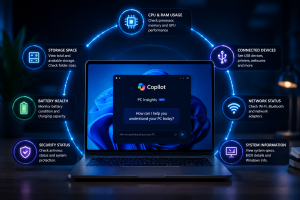
This Image is Ai generated and used for Illustration purposes only.
What Information Can PC Insights Access?
According to Microsoft and reports from Windows Latest, PC Insights can provide details about several parts of a computer.
These include:
- CPU, RAM and GPU usage
- Available storage space
- Folder sizes, including Downloads and Documents
- BIOS and system specifications
- Battery health information
- Antivirus status
- USB devices and external drives
- Printers, webcams and other connected hardware
- Wi-Fi, Bluetooth and network adapters
Furthermore, Copilot can combine this information to provide a clearer picture of overall system performance.
Users Must Approve Access Before Copilot Checks Information
Microsoft says PC Insights does not automatically access a computer’s system details. Instead, users must first provide permission.
Users can select different access options:
| Permission | Explanation |
| Allow for current session | Gives temporary access until Copilot closes or the PC restarts |
| Always allow | Approves similar requests in the future |
| Deny | Blocks access to system information |
Meanwhile, Microsoft says the feature does not continuously monitor computers in the background.
Users can also change or remove permissions later through Copilot’s privacy settings.
Microsoft Says Personal Data Is Not Used for AI Training
Microsoft has stated that PC Insights does not store personal files or use private system information to train its AI models.
However, Copilot conversations, including user prompts and responses, may be used to improve AI services depending on individual privacy settings.
Therefore, users should review their Copilot privacy options if they have concerns about data usage.
Copilot’s Own RAM Usage Creates Concerns
While PC Insights aims to help users understand their computers, the Copilot application itself has attracted attention because of its memory consumption.
According to Windows Latest testing, Copilot used around 800MB of RAM and approached 1GB on a computer with 32GB of memory, even when the app was not actively performing tasks.
However, this was only one test on a specific system. As a result, actual memory usage may differ depending on the device, Windows version and Copilot activity.
Microsoft has not published official details about average Copilot RAM usage.
New Copilot App Uses Web-Based Technology
In addition to PC Insights, reports suggest that Microsoft’s latest Copilot application relies heavily on web technology.
The app reportedly includes Microsoft Edge and Chromium components to support browsing-related features.
Because of this, some users may notice separate Copilot and browser-related processes appearing in Windows Task Manager.
Previously, Microsoft offered a more native Windows-based Copilot experience. However, the company has moved toward a web-based structure as it expands Copilot’s online capabilities.
Copilot Can Explain Issues But Cannot Fix Them Yet
Currently, PC Insights only provides read-only access to system information.
Although Copilot can explain problems and suggest possible solutions, it cannot make automatic changes.
For example, Copilot cannot:
- Change Windows settings automatically
- Delete unnecessary files
- Run repair tools
- Fix performance problems independently
Instead, users must manually follow the recommended steps.
Why PC Insights Could Matter for Windows Users
Overall, PC Insights could make computer troubleshooting easier, especially for people who are unfamiliar with advanced Windows tools.
At the same time, Microsoft will need to address concerns about Copilot’s own resource usage and ensure users understand how their information is handled.
As AI becomes more integrated into operating systems, features like PC Insights could change how users manage and understand their computers.
Key Points :
- Microsoft is testing PC Insights, a new Copilot feature for Windows 11.
- The tool can explain CPU, RAM, GPU, storage and connected device information.
- Users must approve access before Copilot can view system details.
- Microsoft says personal files are not used for AI model training.
- Copilot cannot automatically repair Windows problems yet.
- Early testing suggests Copilot itself may use significant RAM.
- The feature could simplify PC troubleshooting for everyday users.
READ MORE ARTICLES LIKES THESE :

Key Points:
-
Historical Context: Internet pioneer Alex Hills first cataloged the hidden processes that disrupt wireless signals back in 1993.
-
Kitchen Culprits: Kitchen appliances like older microwaves frequently clash with internet routers because they share the 2.4 GHz frequency.
-
Aquatic Barriers: Water-filled fish tanks absorb radio waves effectively. Consequently, they create major signal dead zones through a process called shadowing.
-
Reflective Hurdles: Large mirrors and flat-screen televisions bounce wireless signals away, which severely fragments home coverage.
KARACHI – Modern households run entirely on wireless connectivity, yet several common household items trigger severe Home Wi-Fi interference causes. Internet pioneer Alex Hills, who built early networks at Carnegie Mellon University in 1993, explores these hidden disruptors in his book.
Specifically, older microwave ovens represent a major source of signal degradation. Because these appliances heat food using the 2.4 GHz frequency, they directly overlap with common wireless networks. If a microwave has aging shielding, it can leak radiation during use. As a result, simply warming up dinner can temporarily crash your connection.

This Image is Ai generated and used for Illustration purposes only.
How Water and Mirrors Create Dead Zones
Beyond the kitchen, structural objects and home decor also degrade signal strength. Water molecules absorb radio waves by acting like tiny magnets, which drains the signal’s overall power. Therefore, placing a large fish tank between a router and a laptop creates an immediate dead zone.
Furthermore, dense building materials like brick, concrete, and drywall continuously weaken signal penetration. Reflection poses an equally troublesome issue. Because radio waves are a form of light, they easily bounce off flat, reflective surfaces. Consequently, large mirrors and metallic wall panels deflect signals away from their intended targets.
Household Wi-Fi Obstacle Impact Matrix
| Disruptive Element | Scientific Phenomenon | Primary Effect on Network | Simple Fix / Solution |
| Old Microwaves | Frequency Overlap (2.4 GHz) | Temporary connection drops | Upgrade to 5 GHz network |
| Fish Tanks / Water | Shadowing & Wave Absorption | Complete signal dead zones | Relocate router away from water |
| Mirrors & Large TVs | Signal Reflection | Deflected and scattered waves | Reposition reflective decor |
| Heavy Snow / Ice | Infrastructure Damage | Total network outage | Contact local service provider |
Weather Extremes and Practical Optimization Strategies
Environmental factors outside the home also influence baseline connection speeds. While standard rain rarely affects indoor routers, extreme winter weather can cause severe infrastructure damage. For example, heavy snow accumulation routinely blocks satellite dishes. Meanwhile, sub-zero temperatures can shrink and damage underlying network cables.
To combat these indoor and outdoor obstacles, users should optimize their router placement. Elevating the router to a central, high location drastically improves performance. Finally, installing a mesh network or using modern signal extenders will help bypass dense walls and large mirrors without requiring a complete home redesign.
What are the most common home Wi-Fi interference causes?
The most frequent culprits include older microwaves operating on the 2.4 GHz band, water inside large fish tanks, dense concrete walls, and reflective surfaces like mirrors or televisions.
How do mirrors actively disrupt wireless internet connections?
Since radio signals travel as a form of light waves, flat reflective surfaces act exactly like mirrors to data streams. Consequently, they bounce the signal away from your devices.
What is the best way to bypass these household dead spots?
Moving your router to a central, elevated position is the easiest initial step. However, if dead zones persist, deploying a mesh network or a Wi-Fi extender will successfully route signals around structural obstacles.
Read More : Apple sues OpenAI: Trade secrets case filed.

Key Points:
-
Federal Lawsuit Filed: Apple has officially launched a massive federal lawsuit against OpenAI and two former employees.
-
Severe Accusations Raised: Specifically, the tech giant accuses the defendants of stealing highly confidential information to accelerate OpenAI’s consumer hardware push.
-
Key Targets Named: Furthermore, the 41-page complaint names former Apple executives Tang Yew Tan and Chang Liu alongside multiple OpenAI corporate entities.
-
Partnership Fractured Deeply: Consequently, this high-profile legal battle marks a sharp escalation in tensions between these former technology partners.
KARACHI – Apple has officially filed a major federal lawsuit against OpenAI in California. Specifically, the tech giant accuses the defendants of stealing highly confidential information to accelerate OpenAI’s consumer hardware push. Consequently, this high-profile legal battle marks a sharp escalation in tensions between the former partners. Furthermore, the 41-page complaint names former Apple employees Tang Yew Tan and Chang Liu alongside multiple OpenAI corporate entities. However, OpenAI quickly responded by stating it has zero interest in the trade secrets of competing firms.

Detailed Allegations of Intellectual Property Theft
In the official filing, Apple details a coordinated effort to harvest proprietary intelligence during the recruitment process. For example, the lawsuit claims OpenAI actively coached candidates to share protected details about unreleased Apple products. Specifically, the complaint alleges that former senior engineer Chang Liu deliberately kept a company-issued laptop after leaving.
Subsequently, he exploited a software authentication flaw to access internal servers and download dozens of sensitive files. Meanwhile, the lawsuit targets former product design vice president Tang Yew Tan for similar misconduct. According to the complaint, Tan methodically emailed himself critical supplier lists and internal industry reports before his departure. Moreover, he allegedly instructed prospective hires to bring physical Apple components to job interviews for visual demonstrations.
Enterprise Legal Framework Comparison
| Dispute Element | Specific Allegations Against Chang Liu | Specific Allegations Against Tang Yew Tan |
| Former Apple Role | Senior System Electrical Engineer | Vice President of Product Design |
| Current OpenAI Role | Hardware Division Engineer | Chief Hardware Officer |
| Primary Accusation | Downloaded files via network vulnerability | Shared supplier information and requested physical parts |
| Retained Material | Kept a company-issued work laptop | Emailed internal data summaries to himself |
Hardware Expansion Triggers Open Rivalry
These aggressive hiring strategies directly support OpenAI’s new consumer hardware unit. Previously, OpenAI acquired io Products, a specialized hardware startup co-founded by legendary designer Jony Ive. Although the startup has kept its exact product designs secret, it aims to redefine human interactions with artificial intelligence.
As a result, Apple claims this new venture relies heavily on stolen manufacturing techniques and supply chain data. Ultimately, this intense conflict shatters the collaborative relationship that integrated ChatGPT directly into Apple’s Siri ecosystem. Therefore, Apple now seeks substantial financial damages alongside a strict court order to block OpenAI’s use of its data.
Why is Apple suing OpenAI?
Apple claims that OpenAI systematically poached its engineering talent to steal trade secrets. Specifically, they allege OpenAI used this proprietary data to jumpstart its new consumer hardware division.
What specific items did the former employees allegedly steal?
The lawsuit claims Chang Liu downloaded dozens of confidential hardware files using a retained company laptop. Meanwhile, Tang Yew Tan allegedly took supplier lists and asked job candidates to bring physical Apple components to interviews.
How does this lawsuit affect the existing partnership between the two companies?
This legal battle marks a severe degradation of their relationship. While they previously collaborated to bring ChatGPT features to iPhones, they are now shifting into direct corporate rivals in the consumer hardware space.
Read More : OpenAI retires ChatGPT Atlas browser .
-

 Fashion4 months ago
Kashmiri Churiyan and all you need to know about it before Eid
-
 Pakistan5 months ago
CEO CBD Punjab and Ruda Imran Amin meets with CM’s advisor Ali Mustafa Dar to discuss AI integration and tokenization.
-
 Business6 years ago
Salman Sufi Foundation announcement
-
 Sci&Tech5 years ago
How My Phone’s Most Annoying Feature Saved My Life
-
 Uncategorized6 years ago
New 5G Nokia smartphone unveiled as portfolio expands – ensuring it the only gadget you will ever need
-
 Uncategorized5 years ago
Quetta based Motivational Speaker Maulana Nooruddin Agha mesmerizes students with his motivational skills
-

 Pakistan3 weeks ago
Public holidays declared for 9th and 10th Muharram across Pakistan: Details
-
 Pakistan10 months ago
Free Fire World Series Pakistan 2025, powered by Jazz GameNow, returns with a PKR 35 lakh prize pool